Data Visualizator
Una herramienta dentro del editor de Unity que convierte los datos de las partidas en mapas de calor, marcadores y filtros. Los datos no viven en el juego: viajan a una base de datos MySQL y vuelven al editor listos para analizar.A tool inside the Unity editor that turns play-session data into heatmaps, markers and filters. The data doesn't live in the game: it travels to a MySQL database and comes back to the editor ready to analyse.
- 7tablas relacionadasrelated tables
- 6categorías de eventoevent categories
- 4herramientas de análisisanalysis tools
Del juego a la decisiónFrom the game to the decision
El sistema tiene tres piezas: el cliente de Unity (donde se juega y donde se analiza), un servidor PHP intermedio y la base de datos MySQL. Los datos hacen un viaje de ida y vuelta.The system has three pieces: the Unity client (where the game is played and analysed), an intermediate PHP server and the MySQL database. The data makes a round trip.
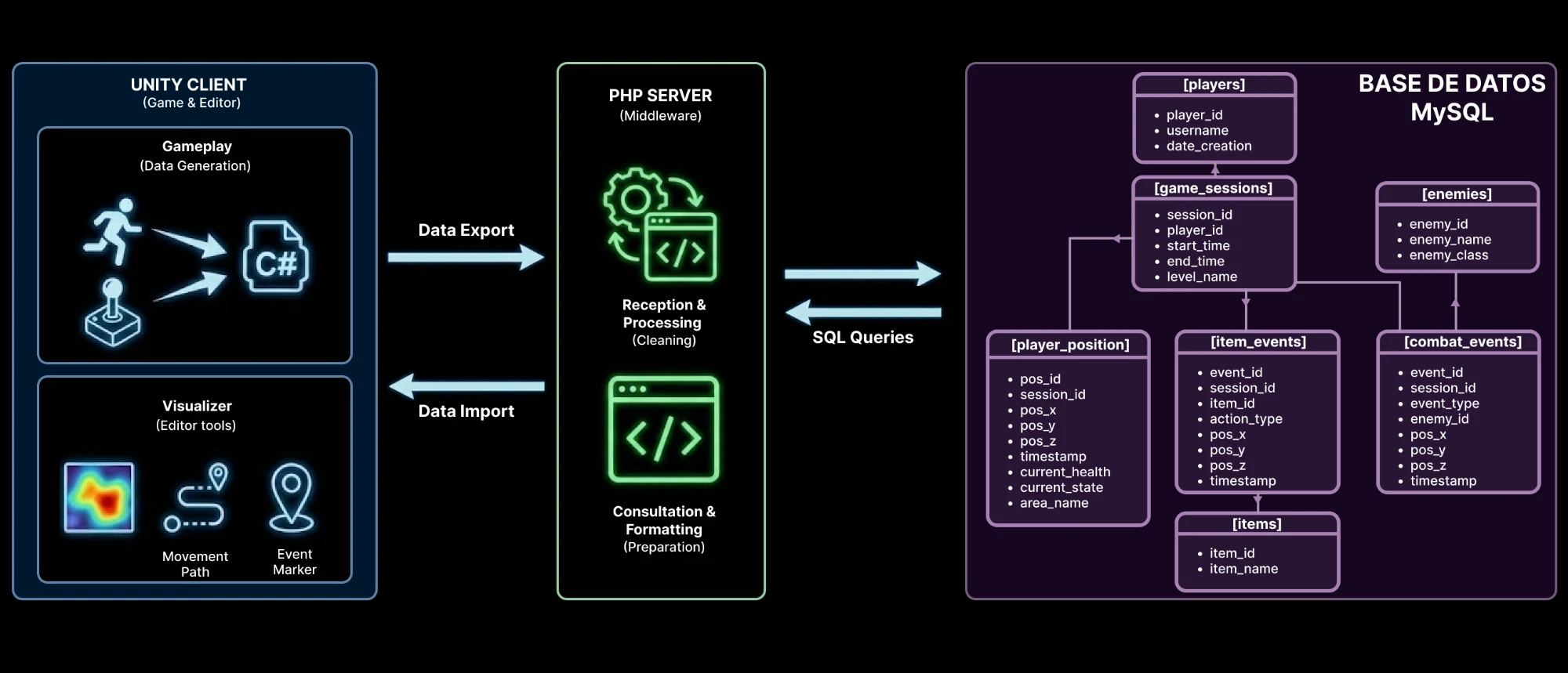
En móvil, desliza el esquema o tócalo para verlo a tamaño completo.On mobile, scroll the diagram or tap it to see it full size.
- 1
GenerarGenerate
Unity · GameplayMientras se juega, el juego registra solo los eventos que se decidió medir (posición, combate, objetos) con una frecuencia de muestreo definida, sin tocar el código central de la jugabilidad.While playing, the game records only the events that were chosen to be measured (position, combat, items) at a defined sampling rate, without touching the core gameplay code.
- 2
Exportar y limpiarExport and clean
Unity → PHPLos datos viajan a un servidor PHP que hace de intermediario: recibe la sesión, la procesa y la limpia antes de guardarla. El editor nunca habla directamente con la base de datos.The data travels to a PHP server that acts as a middleman: it receives the session, processes it and cleans it before storing it. The editor never talks to the database directly.
- 3
Guardar de forma ordenadaStore in an organised way
PHP ⇄ MySQLPHP traduce cada sesión a consultas SQL y la guarda en una base de datos normalizada. La estructura de esa base de datos es lo que hace posible analizar después.PHP turns each session into SQL queries and stores it in a normalised database. The structure of that database is what makes later analysis possible.
- 4
Importar y visualizarImport and visualise
MySQL → PHP → UnityDesde el editor se pide una sesión: PHP consulta la base de datos, prepara y da formato al resultado, y Unity lo dibuja como mapa de calor, marcadores o registro de eventos.From the editor you request a session: PHP queries the database, prepares and formats the result, and Unity draws it as a heatmap, markers or an event log.
La base de datos: donde está el valorThe database: where the value is
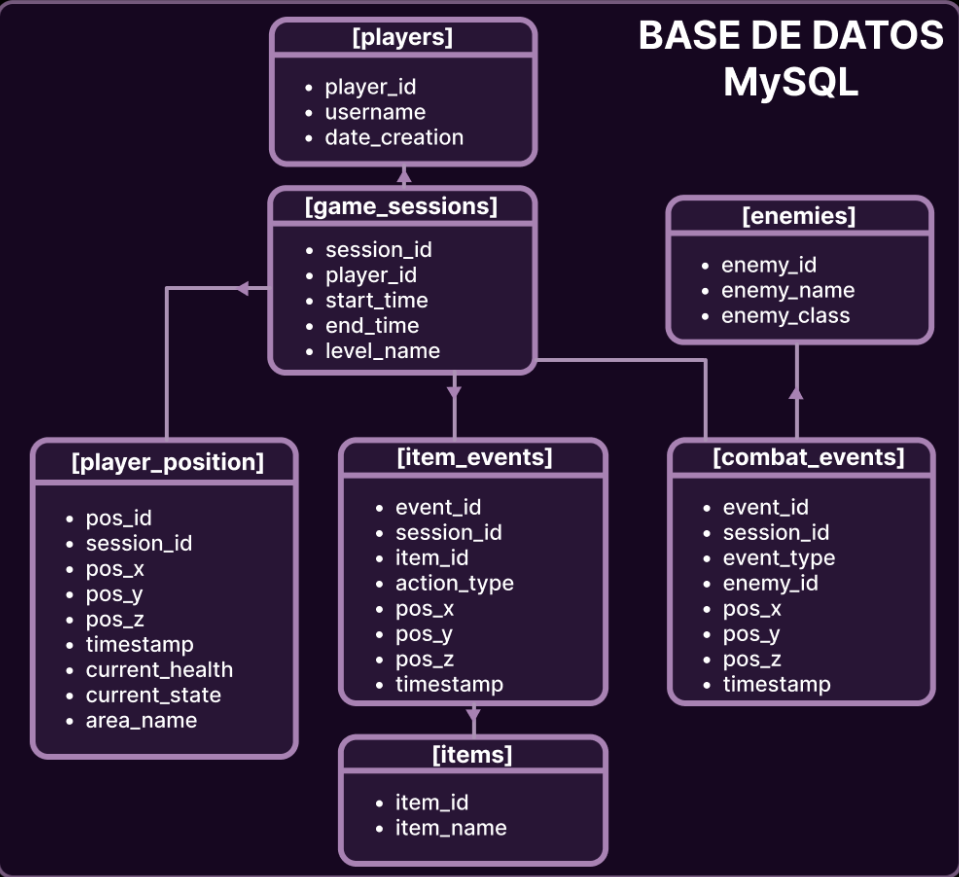
Los mapas de calor son la parte visible, pero lo que hace posible el análisis es cómo están organizados y relacionados los datos. El esquema separa tres tipos de información.Heatmaps are the visible part, but what makes analysis possible is how the data is organised and related. The schema separates three kinds of information.
Quién y cuándoWho and when
playersgame_sessionsCada jugador (players) tiene varias partidas (game_sessions), y cada partida guarda su nivel y su hora de inicio y fin. La sesión es la unidad de análisis: permite comparar a un mismo jugador entre niveles o a distintos jugadores en el mismo nivel.Each player (players) has several plays (game_sessions), and each play stores its level plus start and end time. The session is the unit of analysis: it lets you compare one player across levels, or different players on the same level.
Qué ocurrióWhat happened
player_positioncombat_eventsitem_eventsTres tablas de eventos cuelgan de la sesión mediante session_id. Todas comparten la misma idea: qué pasó, dónde (pos_x, pos_y, pos_z) y cuándo (timestamp). Además, la posición guarda salud, estado y zona; el combate, el tipo de evento y el enemigo; y los objetos, el tipo de acción y el objeto.Three event tables hang off the session through session_id. They all share the same idea: what happened, where (pos_x, pos_y, pos_z) and when (timestamp). On top of that, position stores health, state and area; combat stores the event type and the enemy; and items store the action type and the item.
CatálogosCatalogues
enemiesitemsLos nombres de enemigos y objetos viven en su propia tabla y los eventos solo guardan su identificador. Así no se repiten textos miles de veces, los nombres son coherentes y se puede agrupar por clase de enemigo sin tocar los eventos.Enemy and item names live in their own table and events only store their identifier. That way text is not repeated thousands of times, names stay consistent, and you can group by enemy class without touching the events.
Cómo se relacionanHow they relate
Todo cuelga de la sesión. Un jugador tiene muchas sesiones; una sesión tiene muchos eventos de posición, de combate y de objetos; y cada evento apunta a un enemigo o a un objeto del catálogo.Everything hangs off the session. A player has many sessions; a session has many position, combat and item events; and each event points to an enemy or an item in the catalogue.
players1 → Ngame_sessionsgame_sessions1 → Nplayer_positiongame_sessions1 → Ncombat_eventsgame_sessions1 → Nitem_eventsenemies1 → Ncombat_eventsitems1 → Nitem_events
Tres formas de cortar los datosThree ways to slice the data
EspacialSpatial
pos_x · pos_y · pos_z Dónde ocurre: es lo que dibuja el mapa de calor y coloca los marcadores en la escena.Where it happens: this is what draws the heatmap and places the markers in the scene.
TemporalTemporal
timestamp Cuándo ocurre: permite quedarse solo con un tramo de la partida con el filtro de tiempo.When it happens: lets you keep only a stretch of the play with the time filter.
De contextoContextual
session_id · enemy_id · item_id Quién, en qué nivel y con qué: permite elegir sesión y filtrar por tipo de evento.Who, on which level and with what: lets you pick a session and filter by event type.
Preguntas que permite responderQuestions it can answer
- ¿Por dónde se mueve el jugador y dónde se queda más tiempo?Where does the player move and where do they linger?
player_position - ¿En qué zonas muere o derrota enemigos?In which areas do they die or defeat enemies?
combat_events - ¿Qué clases de enemigo causan más problemas?Which enemy classes cause the most trouble?
combat_eventsenemies - ¿Qué objetos se recogen, se usan o curan, y dónde?Which items are picked up, used or heal, and where?
item_eventsitems - ¿Cómo evoluciona la salud y el estado durante la partida?How do health and state evolve during the play?
player_position - ¿Qué cambia entre jugadores, niveles o momentos de la sesión?What changes between players, levels or moments of the session?
game_sessionsplayers
Detrás de cada pregunta hay una consulta SQL con uniones (joins) y agregaciones. Este ejemplo ilustra el tipo de consulta que el esquema permite:Behind each question there is a SQL query with joins and aggregations. This example illustrates the kind of query the schema allows:
-- Ejemplo ilustrativo / Illustrative example
-- ¿Qué clase de enemigo derrota más al jugador en cada nivel?
SELECT gs.level_name,
       e.enemy_class,
       COUNT(*) AS deaths
FROM combat_events ce
JOIN game_sessions gs ON gs.session_id = ce.session_id
JOIN enemies e        ON e.enemy_id    = ce.enemy_id
WHERE ce.event_type = 'player_death'
GROUP BY gs.level_name, e.enemy_class
ORDER BY deaths DESC;
Las herramientas del editorThe editor tools
Los datos importados se exploran desde una ventana propia en el editor, con cuatro pestañas: Tools, Markers, Heatmap y Events.Imported data is explored from a dedicated editor window with four tabs: Tools, Markers, Heatmap and Events.
Tools
Conecta con el servidor, actualiza la lista de sesiones y descarga la que se quiere estudiar. El filtro de tiempo recorta la sesión entre un inicio y un final, y el editor indica cuántos eventos quedan visibles (por ejemplo, 126 de 214).Connects to the server, refreshes the session list and downloads the one you want to study. The time filter trims the session between a start and an end, and the editor shows how many events remain visible (for example, 126 of 214).
Markers
Muestra u oculta cada categoría de evento en la escena, con su propia forma, tamaño, color y etiqueta. Categorías disponibles:Shows or hides each event category in the scene, each with its own shape, size, colour and label. Available categories:
Player PositionPlayer DeathEnemy DefeatedItem PickupItem InteractItem HealHeatmap
Divide el mapa en una cuadrícula y pinta cada celda según cuántos eventos ocurrieron en ella. Se activa y desactiva con un clic.Splits the map into a grid and paints each cell according to how many events happened in it. It switches on and off with one click.
CuadrículaGrid
Anchura y profundidad en celdas, tamaño y altura de celda: se ajustan al terreno de cada nivel. El editor muestra el área que cubre.Width and depth in cells, plus cell size and height: tuned to the terrain of each level. The editor shows the area it covers.
PincelBrush
Controla cómo «pinta» cada evento: cuánta intensidad suma, hasta dónde llega a valor completo y cuánto se extiende difuminándose. Sirve para pasar de puntos sueltos a zonas legibles.Controls how each event “paints”: how much intensity it adds, how far it reaches at full value and how far it spreads while fading. It turns scattered points into readable areas.
Aspecto y filtradoLook and filtering
Degradado de color y transparencia para que el mapa de calor se lea sobre cualquier escena, y selección de las categorías de evento que lo alimentan (por ejemplo, posición del jugador y muertes).Colour gradient and transparency so the heatmap reads over any scene, and selection of the event categories that feed it (for example, player position and deaths).
Events
Un registro de todos los movimientos y eventos del jugador durante la sesión, filtrable por tipo de evento.A log of all the player's movements and events during the session, filterable by event type.
Mi contribuciónMy contribution
- Definí qué eventos merecía la pena registrar y con qué frecuencia muestrearlos, e instrumenté el juego sin alterar el código central de la jugabilidad.I defined which events were worth tracking and how often to sample them, and instrumented the game without altering the core gameplay code.
- Construí el pipeline: exportación de las sesiones a una base de datos MySQL normalizada mediante scripts PHP, y reimportación a Unity para analizarlas.I built the pipeline: exporting sessions to a normalised MySQL database through PHP scripts, and re-importing them into Unity for analysis.
- Construí la capa de análisis: mapas de calor configurables, marcadores y etiquetas, filtros por tipo de evento y ventana de tiempo, y un registro de eventos de la sesión.I built the analysis layer: configurable heatmaps, markers and labels, filters by event type and time window, and a session event log.
El proyecto cubre el ciclo completo de medir un juego: decidir qué medir, guardarlo de forma consistente y presentarlo para que un equipo pueda actuar sobre ello.The project covers the full cycle of measuring a game: deciding what to measure, storing it consistently and presenting it so a team can act on it.
Ver más proyectosSee more projects